One household.
Room for both of you.
Cover the shared bills, keep personal spending in its own budget, and agree on how to share what's left. Here's a whole month with Alex and Jordan.
Give each account a job.
Alex and Jordan use joint checking, savings and a credit card for their shared life. Each also has personal checking and a personal card. BudgetBuilt puts these into a Household budget and two personal budgets.
The Household
Recurring bills + flexible shared spending.
Mortgage, utilities, groceries, family purchases.
Alex's personal budget
Alex's checking + Alex's card.
Personal spending and Alex's share of the surplus.Jordan's personal budget
Jordan's checking + Jordan's card.
Personal spending and Jordan's share of the surplus.These are ways of organizing your existing accounts. BudgetBuilt doesn't open bank accounts or move money for you. Separate personal budgets describe who is responsible for spending; they aren't a promise that activity is hidden from another household member.
What about retirement, the house and other assets? Balance-only accounts can contribute to Net Worth without funding the monthly budget. Net Worth brings together included assets and debts across the household. A transfer from outside the budget can fund it, but it isn't a new paycheck.
Start with a baseline. Record what the budget accounts held and what the cards owed at the start of your first month. Existing savings aren't income earned this month. If you manage money alone, the Household budget can work on its own.
Still deciding what belongs where? Our guide to joint and separate accounts covers funding choices, shared expenses and purchases made on the wrong card.
See what's left after the bills still to come.
Alex and Jordan add their expected paychecks and recurring bills to the Monthly Plan. Items that haven't arrived yet remain planned. When an actual payment or deposit is matched, it replaces the expected item instead of being counted a second time.
Rounded teaching example throughout this guide; screenshot amounts are from the separate synthetic demo.
If an extra $200 shared purchase posts, the projected surplus falls to $800, assuming everything else stays the same. If a bill hasn't posted, its remaining planned amount still matters. Projected money isn't money already cleared and ready to transfer.

Shared expenses stay shared. Personal choices stay personal.
Groceries on the family card count in the Household. Alex's coffee on Alex's card counts in Alex's personal budget. Personal spending reduces that person's position, rather than being charged to the shared budget.
Account defaults help sort transactions. Review the activity and correct anything that belongs somewhere else. Subscriptions and recurring bills can be reviewed as part of the plan.
A $100 grocery purchase
Counts once as $100 of household spending, even when paid with a credit card.
A $100 card payment
Pays down the debt. It isn't another $100 grocery expense. Cash and the amount owed both fall.
A $100 savings transfer
Moves money. It isn't a purchase or earned income. Its effect on the budget depends on which accounts it moves between.
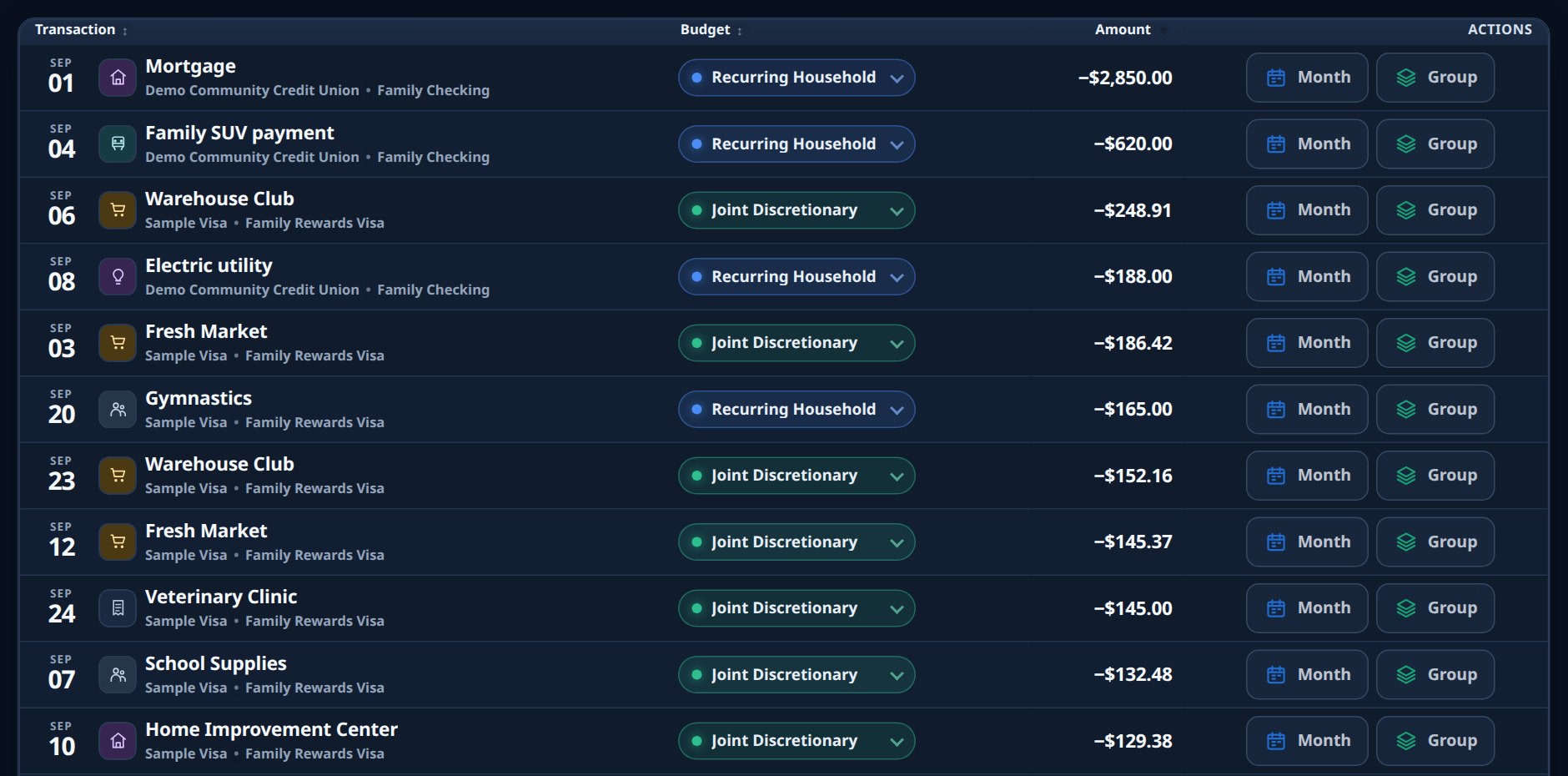
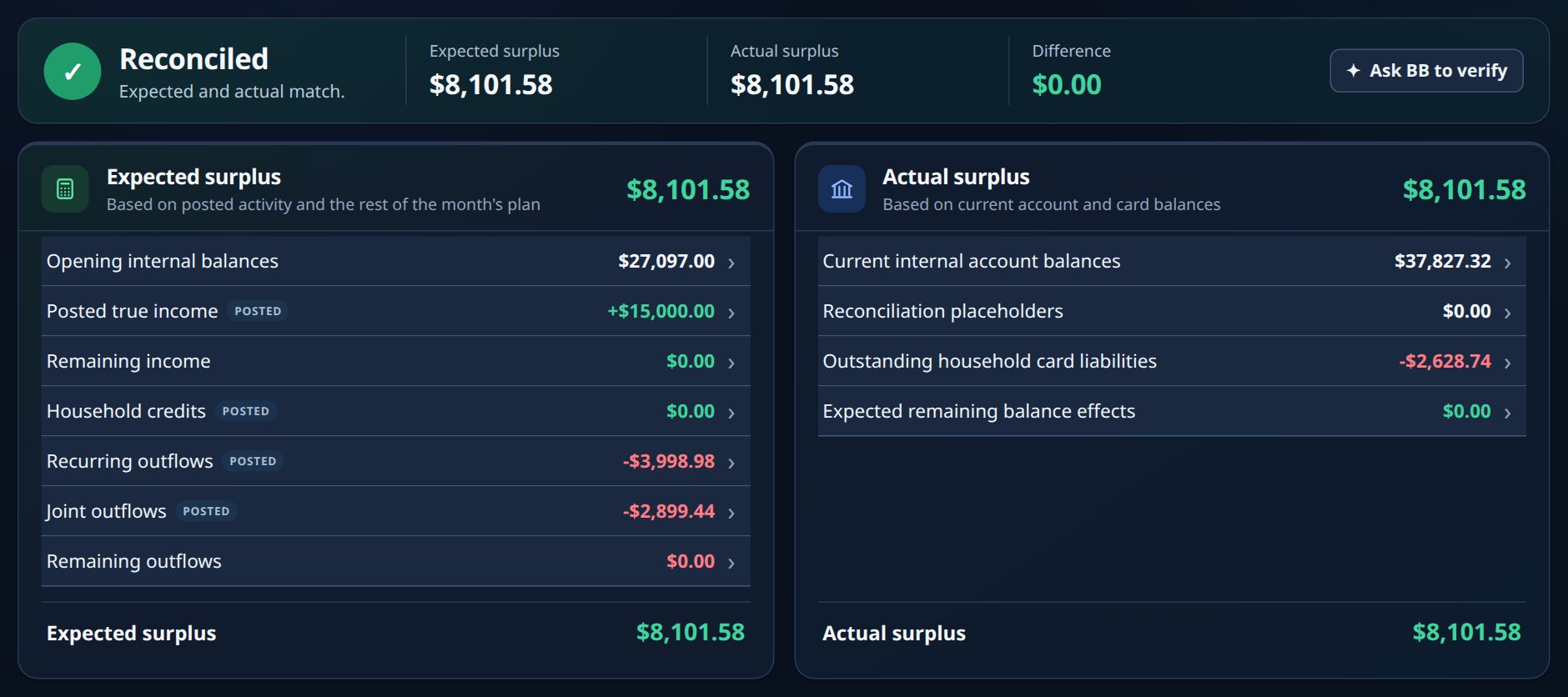
Do the transactions and the balances tell the same story?
That's what reconcile means. BudgetBuilt compares what your opening balances and activity say should remain with what the relevant accounts actually hold, accounting for card debt and the month's remaining items.
The transaction view
In our simplified example, the household starts with $4,500 after card debt. It receives $6,000 and spends $5,000. With no other movements, it should end with $5,500 after card debt.
The balance view
The relevant accounts, less the amount still owed on cards, should support that $5,500. The month's gain is $1,000. The full $5,500 isn't all new surplus.
A difference needs an explanation, not a guess. A card may show a payment before the bank shows the withdrawal. Check sync status, dates, pending payments, missing activity and the opening baseline before changing numbers. A temporary mismatch isn't automatically extra spending or extra income.
Choose how to share the confirmed surplus.
Once the month is checked, the close flow guides the household through card payments, surplus transfers and next month's opening balances. Alex and Jordan perform payments and transfers at their bank, then confirm them in BudgetBuilt.
For this example, assume they have confirmed $1,000 available to distribute after their household commitments and money they intend to retain. They choose 60% for Alex and 40% for Jordan. Your household chooses its own split.
Try a different split
A teaching example only. This doesn't change your accounts or the demo.
Alex 60%
Jordan 40%
At the original 60/40 split, if Alex spent $450 personally, the $600 share covers that spending with $150 left over, before any other personal activity. If Alex spent $750, the share falls $150 short; Alex's existing money or an agreed funding change must cover that gap. A positive Household result doesn't automatically mean both personal budgets are ahead.
- Handle cards: review the amount, payment source and any balance that will remain.
- Make the agreed transfers: use the bank, then record or confirm the moves in the close flow.
- Confirm the next baseline: retained cash and remaining debt carry forward. They don't vanish when the calendar changes.
What if the household ends in a deficit?
There's no positive surplus to split. Review the cause and decide how to cover the shortfall, such as using existing reserves or an agreed contribution. Record the actual movement and confirm the resulting balances. Don't create a surplus by changing the starting numbers to make a difference disappear.
What if I don't pay my card in full?
In the personal card close, enter the payment you actually make and the funding account. Confirm the remaining card balance when prompted. Unpaid debt carries into the next opening position. Current-month purchases and credits must remain accounted for so they aren't mistaken for last month's carryover. BudgetBuilt records the plan; it doesn't send the payment.
What if a refund arrives after the month ends?
Keep the credit connected to what it actually refunds. Review the transaction's month and grouping before changing it. A credit for a new-month purchase shouldn't be moved into the old month just to make a card payment match. The close needs to reflect what you actually pay and what remains owed.
Walk through Alex and Jordan's household.
The guided demo uses synthetic data and needs no signup. Explore the Overview, Monthly Plan, transactions and month close, then see Net Worth and the money-flow view.
Have a question about the system? Ask Mike.